Ex-23: UART with DMA
The blocking HAL UART send function is inefficient and time-consuming for long messages. The CPU is busy copying data into the UART data register and waiting for the message to be transmitted. To reduce this effort, our MCU provides two DMAs that can be used for this simple task instead. In the exercise we will redesign the Ex-22: UART Interrupt Transmit using DMA for data transfer.
Objectives
DMA configuration
UART transmit with DMA
Interrupt priority handling
Outcomes
Advantage of DMA transfers
Limitations of DMA
Using DMA for transmitting messages with the UART
Interrupt prioritisation
Description
With Direct Memory Access (DMA), data can be copied between peripherals and memory without CPU involvement during the transfer. Because the STM32F446re MCU uses fly-through DMA, memory-to-memory transfers can also be performed via DMA. In this exercise, the memory-to-peripheral mode is used to copy the data from memory to the UART peripheral data register. The aim is to extend the Ex-22 by solving it with DMA and checking its behaviour.
Tasks
DMA and interrupts must be enabled for the USART2 peripheral to solve this exercise. The STM32CubeMX automatically uses the correct DMA and stream. See the MCU data sheet for detailed information on DMA and stream mapping. The mode and the data width are configurable. There are two modes: normal and circular. For more information about these two modes, see section Pointer incrementation and circular mode in RM0390 page 212. To send a message via UART, the normal mode is required, and the data size is one byte.
DMA settings for UART2
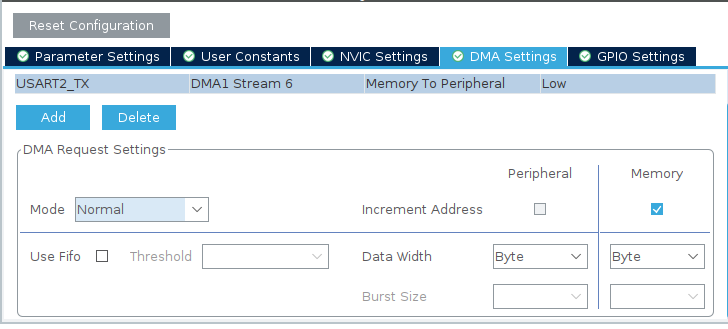
Enabling DMA for USART2_TX
An interrupt is used to acknowledge that the transmission has been completed. This requires the global interrupt to be enabled for the USART2.
Enable Interrupt for UART2
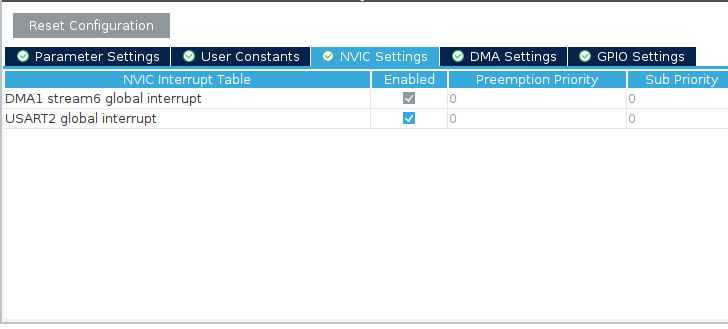
Enabling USART2 global interrupt
Implementation
To ensure the configuration works, start by sending a message using UART and DMA.
Send a message with DMA in the superloop
Create a new project with the default configuration.
Enable DMA and interrupt for UART2 as described in the tasks section.
Send a message to the computer in the superloop using the
HAL_UART_Transmit_DMA()function.Test your implementation and configuration to ensure you are receiving data continuously.
Once the DMA transfer to the UART has been successfully commissioned, a message should also be sent from a basic timer interrupt.
Additional interrupt message
Initialise a simple timer with an interrupt with a frequency of .
Send a message to the computer using DMA and UART.
Test your implementation and check your configuration by answering the following questions:
Question
Are you receiving a message from both tasks?
What is the priority of the interrupts (timer and UART)?
What is the return value of the send function?
The first try with DMA from the interrupt and from the superloop may not be successful.
This is because the function cannot register a new address to send to until it has completed the last transmission.
HAL deletes the transmission in the interrupt callback UART_DMATransmitCplt().
To ensure the interrupt message can be sent, wait until the message from the superloop has finished.
Note
As you are blocking the system in the interrupt, this is not a good solution.
Synchronisation of interrupt message
Set the interrupt priority of the timer interrupt lower than the UART interrupt.
Wait in the superloop until the message can be sent (check the return value).
Test your implementation and check your configuration by answering the following questions:
Question
Are you receiving the messages from both tasks?
Does this implementation work forever? (Let it run for at least a minute)
What’s wrong with this implementation?
Hint
Take a look at the function
HAL_UART_Transmit_DMA(). When is the UART instance set to busy? Is it possible to interrupt between the timer setting the busy status and the start of the DMA process? What effect does this situation have?How would you improve it?